
EN
Topbar Menu Icon 1Help Centre
Topbar Menu Icon 2Contact Us
Company Logo
Trading
Our Markets
  • Forex
  • Commodities
  • Metals
  • Stocks
  • Indices
  • Cryptocurrencies
  • Futures
  • ETFs
  • Crosses
Our Accounts
  • Advantage
  • Advantage Plus
  • Advantage Stocks
  • Practice
Our Platforms
  • Desktop
  • Mobile App
  • MetaTrader 4
  • MetaTrader 5
Terms
  • Fees
  • Deposits and Withdrawals
  • Dividends Calendar
  • Contract Specifications
  • Leverage and Margin
Tools & Analysis
Market Analysis
  • Economic Events
  • Meet the Team
Tools
  • Pip Calculator
  • Profit Calculator
  • Currency Converter
  • Economic Calendar
  • Trading Schedule
Rewards & Promos
FXTM Rewards
    Promotions
    • Refer a Friend
    Learn
    Learn to Trade
      Popular Guides
      • Forex Trading for Beginners
      • CFD Trading for Beginners
      About
      About Us
      • Fund Safety
      • Blog
      Partners
      • Affiliates
      Terms and Conditions

          FXTM Trading App Tutorials: Navigating the Help Centre

          * Trading is risky. Your capital is at risk.

          side image

          How to navigate the Help Centre in the FXTM Trading App

          Trading can sometimes feel complex, especially when you are just starting out. Whether you have a question about a specific feature or need assistance with your account, knowing how to find help quickly is essential for a smooth trading experience.

          The FXTM app is designed with this in mind. It offers multiple ways to get the support you need, right at your fingertips.

          This guide will walk you through the simple steps to access the help centre and other support features within the FXTM app.

          Using information icons for quick definitions

          Sometimes you might encounter a term or feature you do not recognise while navigating the app. You do not need to leave the screen to find out what it means.

          Look for the small 'i' icons located next to various terms and features throughout the app. These are information icons.

          Simply tap on an icon to see a pop-up definition or explanation. This feature allows you to learn as you go, without interrupting your trading flow. It is perfect for getting quick clarity on specific trading terms or app functions.

          Navigating to the support tab via your profile

          For more comprehensive assistance, you will need to head to the main support area of the app. This is easily accessible through your profile.

          First, tap on the Profile link. You will typically find this in the bottom right-hand corner of your screen.

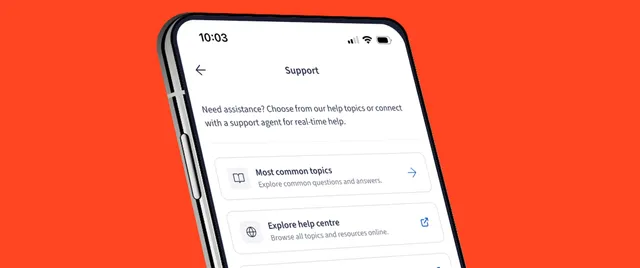
          Once your profile menu opens, look for the Support tab. Tapping this will take you to a dedicated hub for all your help and support needs. This is your gateway to finding answers to more detailed questions.

          Browsing common topics

          When you open the Support tab, you will see a list of Most common topics.

          These are the questions that other traders ask most frequently. They cover a wide range of subjects, from account verification and deposits to trading platforms and withdrawals.

          Browsing this list is often the fastest way to find a solution. There is a good chance your question has been asked before, and the answer is waiting for you right there. Tap on any topic to read the detailed answer.

          Exploring the full help centre

          If your query isn't covered in the common topics list, do not worry. You can dive deeper into the full knowledge base.

          Scroll down to the bottom of the Support page and select the button that says Go to Help Centre.

          This will redirect you to the comprehensive Help Centre. Here, you can search for specific keywords related to your issue or browse through various categories to find exactly what you need. It is a vast library of information designed to help you manage your trading account effectively.

          Chatting live with an agent

          Sometimes, you just need to speak to a real person. If you cannot find the answer you are looking for in the Help Centre, or if you have a specific issue that requires personal attention, you can start a live chat.

          In the Support tab or the Help Centre, look for the chat icon. Tap it to start a Live Chat session.

          You will be connected with a support agent who can assist you in real-time. They are there to guide you through any technical difficulties or account-related queries you might have. This direct line of communication ensures you are never left stuck without a solution.

          Explore more of the FXTM app

          Now you know how to find help whenever you need it. having this safety net allows you to trade with more confidence, knowing that support is just a few taps away.

          The FXTM app has many more features designed to make your trading journey easier. Be sure to check out our other how-to videos and guides to get the most out of your experience.
          More FXTM App tutorials

          Navigating the Help CentreApp Tutorials

          Navigating the Help Centre

          Watch
          Manage FXTM RewardsApp Tutorials

          Manage FXTM Rewards

          Watch
          How to place a tradeApp Tutorials

          How to place a trade

          Watch
          How to withdraw fundsApp Tutorials

          How to withdraw funds

          Watch
          How to deposit fundsApp Tutorials

          How to deposit funds

          Watch
          Navigating the DashboardApp Tutorials

          Navigating the Dashboard

          Watch
          Press enquires

          Have more questions?

          Get in touch with the friendly FXTM support team.

          Social Media Icon 1Social Media Icon 2

          Our offering

          • Markets
          • Accounts
          • Platforms
          • Tools
          • Trading terms

          Popular markets

          • Forex
          • Commodities
          • Metals

          Trading

          • Mobile App
          • MetaTrader 4
          • Metatrader 5

          Learn

          • Learn to trade

          Company

          • About us
          • Blog
          • Partners
          • Affiliates
          • Terms and Conditions

          Exinity Limited, with registration number C119470 C1/GBL and registration address at 5th Floor, NEX Tower, Rue du Savoir, Cybercity, 72201 Ebene, Republic of Mauritius is regulated by the Financial Services Commission of the Republic of Mauritius with an Investment Dealer License with license number C113012295, licensed by the Financial Sector Conduct Authority (FSCA) of South Africa, with FSP No. 50320 and is a licensed Over the Counter Derivative Provider. Exinity Works (CY) Ltd, with registration number HE 351684 and registered address Agiou Athanasiou 30, Ksenos Building, Floors 2-5, Agios Athanasios, Limassol, 4102, Cyprus. Exinity Works (CY) Ltd does not engage in any regulated financial or investment activities.

          Risk Warning: Trading Leveraged Financial instruments involves significant risk and can result in the loss of your invested capital. You should not invest more than you can afford to lose and should ensure that you fully understand the risks involved. Trading leveraged products may not be suitable for all investors. The value of shares can fall as well as rise, which could mean getting back less than you originally put in. Past performance does not guarantee future results. Before trading, take into consideration your level of experience, investment objectives and seek independent financial advice if necessary. It is the responsibility of the client to ascertain whether they are permitted to use the services of Exinity brand based on the legal requirements in their country of residence.

          Please read our full Risk Disclosure.

          Regional restrictions Exinity Limited does not provide services to residents of the USA, Mauritius, Japan, Canada, Haiti, Iran, Suriname, the Democratic People's Republic of Korea, Puerto Rico, the Occupied Area of Cyprus, Quebec, Iraq, Syria, Cuba, Belarus, Myanmar, Russia and India.

          logo
          We value your privacy
          We use cookies to give you the best-possible experience on our site and serve you personalised content. Click "Sounds good" to agree to our Cookie Policy.
          Sounds good