
FXTM Trading App Tutorials: How to place a trade
* Trading is risky. Your capital is at risk.

Placing a trade on the FXTM App
Welcome to this FXTM Trading App tutorial. In this guide, we’ll cover how to place your very first trade.
Step 1: Access the Trading Hub
Start on the Home screen of the app. Look for the Trade icon located at the bottom of your screen and tap it.
This action takes you directly to the trading area. Here, you will see a list of assets alongside their current buy and sell prices.
Step 2: Choose your market
You have access to a wide range of financial instruments. To filter what you see, tap the drop-down box at the top of the screen.
From here, you can select from different markets, such as forex, metals, indices, and others. This helps you find your preferred asset class quickly.
Step 3: Select your instrument
Once you have filtered your list, tap on the specific instrument you wish to trade, for example, EURUSD.
This opens a detailed view of that forex pair. You will see an interactive chart, technical indicators, and live pricing to help you analyse the market before you act.
Step 4: Set your trade size
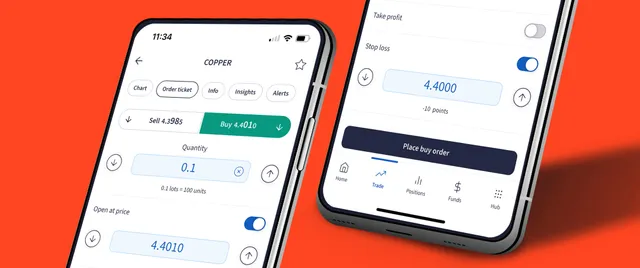
When you are ready to proceed, tap the Buy button to open the trade order ticket. Now you must decide the size of your position.
Adjust the lot quantity by using the up or down arrows. Alternatively, tap inside the box to bring up the number pad and type in the exact number of lots you wish to buy.
Step 5: Manage your risk
This step is vital for protecting your capital. You will see switches for options like Open Price, Take Profit, and Stop Loss.
Toggle these on to input your desired levels. While these settings are optional, we highly recommend setting a Stop Loss and Take Profit for effective risk management.
If you leave the entry toggle off, the app will execute your trade at the current market price.
Step 6: Confirm the order
Tap 'Place Buy Order' to proceed. The app will present a summary of your order details for you to review.
Check that the details are correct, then tap 'Confirm Buy Order'. This executes your trade instantly.
Step 7: Monitor your position
Your order is now confirmed. You can see your new open position in the Positions tab.
Visit this tab anytime to track how your trade is performing and view your current profit or loss.
Bottom line
And that wraps up how to place a trade in the FXTM App.
Check out our other how-to videos and guides to explore the full potential of the FXTM App. below.