
FXTM Trading App Tutorials: How to deposit funds
* Trading is risky. Your capital is at risk.

How to deposit funds
Welcome to this FXTM Trading App tutorial. In this guide, we’ll cover how to deposit funds in to your trading account.
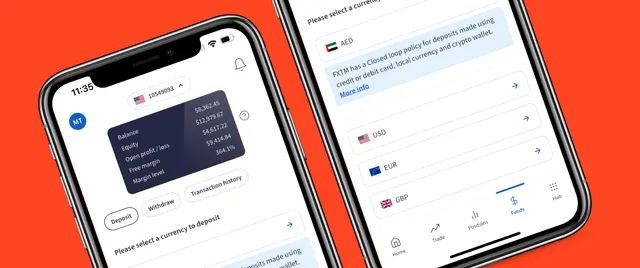
To get started, open the FXTM app and sign in. Starting from the Home screen, tap on ‘Funds’ at the bottom of the screen. This automatically opens on the ‘Deposit’ tab.
Choosing your deposit method
Select the currency you want to deposit from the available options.
Now, we can select the deposit method. You’ll see different options based on your region and local services. Here, you’ll enter your card details, confirm your billing details, if necessary, and tap on DEPOSIT.
Your deposit will be confirmed as successful. On the ‘Funds’ screen you can tap on the ‘Transaction history’ to see the full details of the deposit.
Verifying your deposit
Your deposit will be confirmed as successful. On the ‘Funds’ screen you can tap on the ‘Transaction history’ to see the full details of the deposit.
Back on the ‘Home’ screen, you can see your newly added funds are available in your balance – ready to place your trade!
Please be aware that low-value deposits may attract a small processing fee.
The bottom line
And that wraps up how to deposit funds to your FXTM account.
Check out our other how-to videos to explore more of the FXTM App below.