
FXTM Trading App Tutorials: Navigating the Help Centre
* Trading is risky. Your capital is at risk.

How to navigate the Help Centre in the FXTM Trading App
Trading can sometimes feel complex, especially when you are just starting out. Whether you have a question about a specific feature or need assistance with your account, knowing how to find help quickly is essential for a smooth trading experience.
The FXTM app is designed with this in mind. It offers multiple ways to get the support you need, right at your fingertips.
This guide will walk you through the simple steps to access the help centre and other support features within the FXTM app.
Using information icons for quick definitions
Sometimes you might encounter a term or feature you do not recognise while navigating the app. You do not need to leave the screen to find out what it means.
Look for the small 'i' icons located next to various terms and features throughout the app. These are information icons.
Simply tap on an icon to see a pop-up definition or explanation. This feature allows you to learn as you go, without interrupting your trading flow. It is perfect for getting quick clarity on specific trading terms or app functions.
Navigating to the support tab via your profile
For more comprehensive assistance, you will need to head to the main support area of the app. This is easily accessible through your profile.
First, tap on the Profile link. You will typically find this in the bottom right-hand corner of your screen.
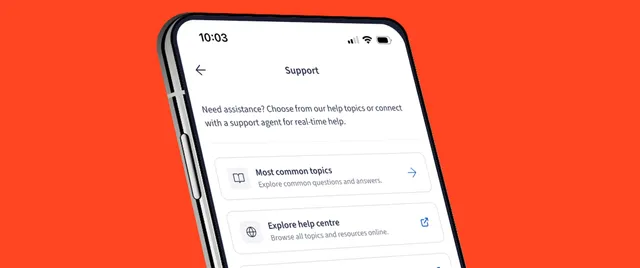
Once your profile menu opens, look for the Support tab. Tapping this will take you to a dedicated hub for all your help and support needs. This is your gateway to finding answers to more detailed questions.
Browsing common topics
When you open the Support tab, you will see a list of Most common topics.
These are the questions that other traders ask most frequently. They cover a wide range of subjects, from account verification and deposits to trading platforms and withdrawals.
Browsing this list is often the fastest way to find a solution. There is a good chance your question has been asked before, and the answer is waiting for you right there. Tap on any topic to read the detailed answer.
Exploring the full help centre
If your query isn't covered in the common topics list, do not worry. You can dive deeper into the full knowledge base.
Scroll down to the bottom of the Support page and select the button that says Go to Help Centre.
This will redirect you to the comprehensive Help Centre. Here, you can search for specific keywords related to your issue or browse through various categories to find exactly what you need. It is a vast library of information designed to help you manage your trading account effectively.
Chatting live with an agent
Sometimes, you just need to speak to a real person. If you cannot find the answer you are looking for in the Help Centre, or if you have a specific issue that requires personal attention, you can start a live chat.
In the Support tab or the Help Centre, look for the chat icon. Tap it to start a Live Chat session.
You will be connected with a support agent who can assist you in real-time. They are there to guide you through any technical difficulties or account-related queries you might have. This direct line of communication ensures you are never left stuck without a solution.
Explore more of the FXTM app
Now you know how to find help whenever you need it. having this safety net allows you to trade with more confidence, knowing that support is just a few taps away.
The FXTM app has many more features designed to make your trading journey easier. Be sure to check out our other how-to videos and guides to get the most out of your experience.